Home › Mobile wallets abroad
You tap your phone and it's paid, but do you know which card and which rate it just used? Apple Pay and Google Pay abroad: who sets the rate, and whether to pick local currency
You hold the phone to the reader, it beeps, and it's paid. What just happened is very nearly identical to pushing your plastic into the slot. Apple Pay and Google Pay don't convert currency for you; the money runs on the physical card you loaded into it, at that card's rate and that card's fees. So the currency-conversion fee and the foreign-transaction fee that card charges don't shrink one cent because you paid with your phone. And don't forget, the till can still throw up "pay in your home currency or local currency?" on a tap, and the answer is the same as ever: always pick local currency. Below are the real things about using a mobile wallet abroad: who actually sets the rate, why the amount shown in the wallet is an estimate, which card to load to spend less, and how to reconcile after all that frictionless tapping.
On this page
- One tap: which card does the money actually run on
- The conversion and foreign-transaction fees still apply
- On a tap, the till still shows DCC
- The amount in the wallet: estimate or final
- Whether Apple Pay and Google Pay work country to country
- Ten minutes before you fly, set the wallet up so it works
- The ease of small contactless taps, and its reconciling cost
- Nothing happened when you tapped: three situations, three answers
- Which card should you actually load?
- Mobile wallet vs chip-and-PIN vs cash, in one table
- The things people most often take for granted
- Common questions
- What to read next
01One tap: which card does the money actually run on
The short version: a mobile wallet just puts your physical card inside your phone, and the rail, the rate and the fees are all that card's. The phone itself doesn't touch the exchange.
Apple Pay and Google Pay are essentially a "stand-in" for a card. You load a Visa, Mastercard or other card, and the phone generates a device-specific account number for it (the industry calls it a token); on a tap, what goes to the terminal is that token, not your real card number. But the path of the money doesn't change: the transaction still runs from the acquirer to the card network and back to your issuer to settle. The phone's only job in that chain is to "represent that card securely". It doesn't set the rate, and it doesn't slip in a fee of its own.
So a crucial corollary: whichever card you loaded is exactly the cost you carry abroad. Load a credit card with a 3% foreign-transaction fee, and tapping it out with your phone is still that 3%. Load a multi-currency card that waives conversion fees on overseas spending, and only then does the tap actually save you money. The phone is the shell; the card is the substance.
02The conversion and foreign-transaction fees still apply
Changing your posture from card to phone does nothing to the issuer's side of the deal. It still charges the same foreign-transaction fee / currency-conversion fee.
This is the most common illusion. A lot of people vaguely feel "Apple Pay seems cheaper, a bit fancier", and assume it comes with a fee perk too. It doesn't. The fee is charged by your issuer under that card's rules, with nothing to do with whether you dipped, swiped, or tapped your phone. The terminal sees the same foreign-currency transaction, the network converts it on the same reference rate, and the issuer adds the same fee.
Put another way, a mobile wallet saves you the act of pulling out a card and the hygiene of touching things. It doesn't save money. If you genuinely want to cut your conversion cost abroad, you have to go back to the source, "which card", not "how you swipe that card". That's exactly why section seven below deserves its own heading: before you travel, set the right card as your wallet's default.
03On a tap, the till still shows DCC
Straight up: after a phone tap, the cashier's machine can still ask "home currency or local currency", and the answer is identical to a chip payment, pick local currency.
Many people assume a tap is "instant pay" with no currency choice. In fact whether DCC (dynamic currency conversion) pops up depends on whether the till's terminal has that feature switched on, not on whether you used a phone or a card. The common scenario: you hold your phone up, hear the beep, and the currency options only appear on the cashier's screen after that. Then the cashier, to save time, picks "home currency" for you while you're already turning to leave, and you never see it. You only notice back home, reconciling, that the rate on that charge was wildly off.
How to guard against it: after a tap, don't pocket your phone and walk. Glance at the cashier's screen or the terminal handed to you, and check the currency is the local one. Some terminals let you confirm currency again after a phone tap, so read it before you press. And glance at the settlement currency on the slip. If it settled in your home currency, you can have the cashier void and re-run on the spot, far easier than disputing later. DCC gets pulled apart in more detail in its own piece, and a phone tap doesn't make you immune to it.
04The amount in the wallet: estimate or final
Treat the home-currency figure in the wallet's transaction record as an estimate, and the final charge is whatever the bank statement says.
After you tap, a record surfaces in the phone's notifications or the wallet app, sometimes straight in your home currency, which looks nice and clear. But note that this number is often the phone's on-the-spot estimate using an approximate rate, just to give you a sense of it. The real posting waits for your issuer to settle, and the rate used then, plus the foreign-transaction fee, is the final figure on the statement. The two can differ a little.
So don't treat that instant line in the wallet app as the final bill. To actually check what a trip cost, or whether you caught DCC, you still go back to the bank statement: find that charge's original amount (local currency) and the amount actually posted (home currency), divide one by the other for the effective rate, and compare it to that day's mid-market. That reconciling method is in the DCC piece, and it works exactly the same for a mobile wallet.
05Whether Apple Pay and Google Pay work country to country
Here's the gist: whether your mobile wallet works depends on whether the local merchant's reader accepts contactless, and on whether your card is accepted locally, and both vary a lot country to country.
In places where contactless is everywhere, like much of Europe, Japan, Korea and Australia, readers with that little fan-shaped wireless symbol are nearly universal, and phone taps go through smoothly. But some countries, some small shops, and some older terminals only take a dipped chip, and holding your phone up does nothing, so you still have to pull out the physical card. Don't leave the physical card at the hotel: the mobile wallet is the main act, the physical card is the backup you must carry.
Also, the card you loaded has to be accepted at the destination in the first place. Visa, Mastercard and other networks don't cover the globe identically, and some regions lean on one over another. The pre-trip homework is: check which card network is common at your destination and whether your card works there, then set your wallet's default to the most suitable one. For exactly which countries and which phone models are supported, follow the Apple Pay support page and Google Pay help, which keep their coverage current.
06Ten minutes before you fly, set the wallet up so it works
Knowing your phone works in a country is one thing. Standing at a till and having the payment go through is another. What follows all happens on the phone, takes under ten minutes altogether, and every item that gets skipped fails at one specific moment later. Each has a way of telling you it's done.
- Set the card you intend to use as the default. If several cards live in the wallet, know which one comes up first. Done when: double-pressing the button, choosing nothing, shows the card you meant to pay with.
- Check the card itself is cleared for use abroad. Plenty of cards ship with foreign transactions switched off, or carry a separate travel toggle or limit. This has nothing to do with the phone; it is a setting on the card. Done when: your banking app or an adviser has said, in those words, that foreign transactions are enabled.
- Take the physical card, and keep it somewhere else. Not caution for its own sake — the section after next explains the hard limit that makes it necessary. Done when: the card is not in the pocket holding the phone.
- Save the issuer's overseas number in your contacts. When a card misbehaves you are usually the one without data. Done when: you can find that number with the phone offline.
- Decide what a flat battery means for you. The phone is your payment method, your map and your boarding pass at once. Some handsets keep a payment or transit card alive briefly on reserve power, but a trip shouldn't rest on that feature. Done when: there is a charged power bank in the bag.
One thing is worth settling before you go: a mobile wallet does not hand you a new payment channel. It changes how you get your card out of your pocket, and nothing else. Which means the rules, the charges and the protections that apply are the card's, not Apple's or Google's. Official guidance groups them exactly that way — the EU's public consumer pages file “payments by debit or credit card” alongside ATM withdrawals and cross-border transfers, all under what your bank may charge.
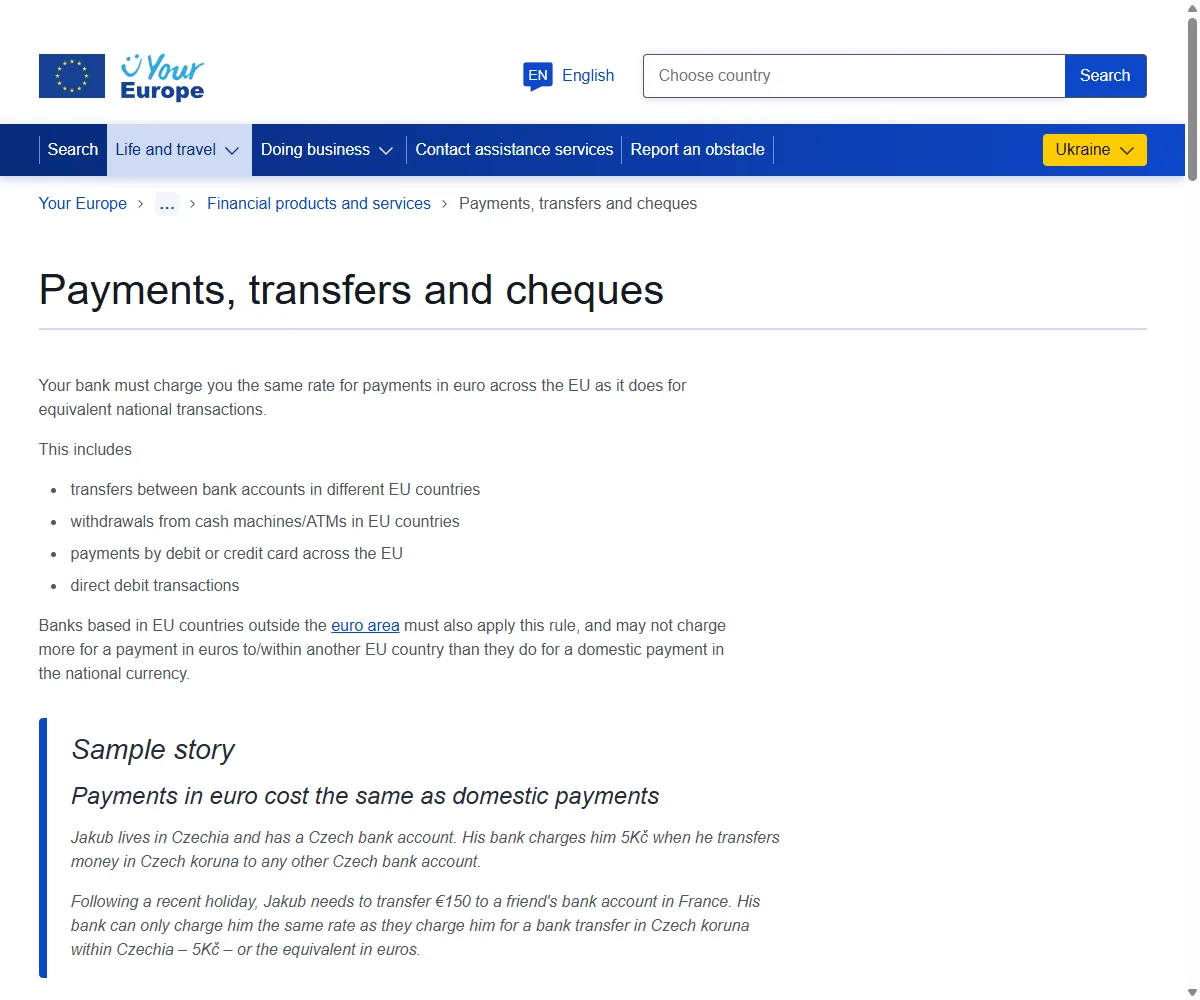
Two further rules on that page matter to a traveller. First, a trader may not add a fee simply because you paid with a particular card — surcharging — and that covers card purchases in shops and online across the EU. It does not cover cards issued by three-party schemes such as American Express and Diners Club, nor business and corporate cards, and those exclusions are precisely where a surcharge is most likely to turn up. Second, an online payment above a stated threshold (€30 on that page when we checked it in September 2026; go by the page's current wording) needs two authentication elements — something you have, such as the phone, plus something you know or something you are. A wallet payment satisfies both by design, which is why booking a taxi or a train ticket from the phone mid-trip usually goes through without a fight.
Worth saying plainly: those are EU rules, covering payments that happen in the EU. Somewhere else, local rules apply, and carrying that protection in your head to a country it doesn't reach is how people get caught out.
07The ease of small contactless taps, and its reconciling cost
Small taps without a PIN really are fast. But "no PIN, no signature" also means you lose a chance to check the currency and amount, so reconcile more diligently.
A mobile wallet buying a coffee or riding the metro abroad is often below the local no-PIN ceiling: hold it up and go, with the unlock verification happening on the phone in an instant. It really is convenient. But that smoothness has a side effect: the whole thing is so fast you never get a chance to see what currency this was, or how much, especially where the till terminal pops DCC. You beep and walk, and you've effectively defaulted the choice away.
The fix isn't hard, but it has to become habit. One, keep a card with no foreign-transaction fee as your default, so every small tap carries one less markup. Two, at the hotel or before bed, flick through the day's records in the wallet app, checking for wrong currencies or amounts that look off. Three, larger charges (above the local no-PIN ceiling) that need verification already make you pause, which is the perfect moment to read the currency before confirming. Convenience and reconciling don't conflict; just don't let convenience quietly cut out the reconciling too.
08Nothing happened when you tapped: three situations, three answers
The phone goes to the reader, nothing happens, and there is a queue behind you. Tapping again, harder, is the one move that never helps. Work out which of three situations you are in first, because the fixes have nothing in common, and only one of them means anything is wrong with your card.
One: the terminal doesn't take contactless at all
Not every reader has contactless switched on, particularly older units in small shops and some self-service machines. You can tell quickly: look for the wave symbol on the terminal, or a prompt inviting you to tap. If it isn't there, it isn't there. The answer is the physical card in the slot, and the phone cannot help you at all.
Two: it takes contactless, but this amount is over the limit
This is the one most often misread as a dead card. Contactless carries a per-transaction ceiling, above which the cardholder has to be verified. Tapping a physical card over that ceiling gets you asked for chip and PIN. A wallet payment authenticates with your face or fingerprint, so in many places it isn't bound by the same ceiling — but that depends on how the local terminal and your issuer are configured, and it is not universal. When a terminal insists on a PIN, the phone cannot supply the physical card's PIN. Only the card itself, in the slot, will do. That is the real reason the earlier section tells you to carry it, and it is where “phone only, no card” comes apart.
Three: the terminal is fine, the amount is small, and it still declines
This one is genuinely about the card, and it is usually the issuer's fraud system rather than anything to do with the phone. It behaves exactly like a physical card being declined abroad and is handled the same way — the full sequence is in this piece.
To tell them apart quickly, work down this order. Each step narrows it:
- Take out the physical card and try it in the same terminal. This is the step that earns its keep. If it works, the card is fine and the problem sits on the contactless or wallet side. If it declines too, it's the card or the issuer, and you can jump straight to step four.
- Try another card from the wallet. If the second one goes through, the first card is the problem, not the phone.
- Change the method. Cash, or ask the assistant for a different terminal. Don't keep retrying the same card on the same reader; a run of failures can tighten a block rather than clear it.
- Call the issuer on the number you saved before leaving. Give the merchant name, the amount and the local time — it moves considerably faster than “my card doesn't work”.
09Which card should you actually load?
Put plainly: before you travel, set your wallet's default card to your lowest-cost card abroad. That one step matters far more than agonising over "does a phone tap save money".
Since the phone is only the shell and the cost is all in the card, the lever for saving is plain: make the card you tap out the cheapest one to begin with. In practice, it's a few things.
- Before you go, switch the default card in the wallet app to the one with a low or zero foreign-transaction fee. Don't leave it parked on an everyday card with a 3% fee.
- If you have a multi-currency card and the destination currency is one it holds, load it as the default to skip a conversion.
- You can load several cards; before paying you can long-press or switch in the app, so when a merchant only takes one network, you tap a different card.
- Carry the physical card anyway: when the phone dies, the terminal doesn't take contactless, or a charge needs chip-and-PIN, it's the only thing that saves you.
Ultimately, the value of a mobile wallet abroad isn't "saving fees" (it doesn't), it's letting you set the cheapest card up front and then tap mindlessly, without digging through your wallet each time to work out which card is best. Ease is its strong suit; saving money is down to you picking the right card inside it.
10Mobile wallet vs chip-and-PIN vs cash, in one table
The three ways to pay each have their own character abroad. The table below flattens them across the dimensions you actually care about, so you can choose by scene.
| Dimension | Mobile wallet tap | Physical card, dipped | Cash |
|---|---|---|---|
| Rate used | Loaded card's network rate | Same card's network rate | Bureau / ATM rate, usually worse |
| Foreign-transaction fee | Charged per loaded card | Charged per that card | FX spread plus possible fees |
| Can it hit DCC | Yes, read the screen after tapping | Yes, choose on the machine | No DCC, but an FX spread instead |
| Convenience | Fastest, hold and go | Dip, wait, sometimes sign | Find a bureau, get change, carry it |
| Ease of reconciling | Instant record but an estimate, still the statement | Slip plus statement, easy to check | Just a receipt, track it yourself |
| Breadth of acceptance | Depends on local contactless | Depends on local network acceptance | Taken almost anywhere, small shops especially |
The table in one line: a mobile wallet is the easiest, but it saves no money and doesn't dodge DCC; the physical card is its essential backup; and cash is still irreplaceable at the small places that take no cards. Carry all three and use them knowingly, and you've got spending abroad about right.
Transaction Currency the local one; did DCC / Conversion Rate pop up making you choose; and if a slip prints, glance at the currency symbol and amount on it. When you reconcile later, the line in the wallet app often carries an estimate / pending label, and the real figure is the posted amount / Original Amount on your bank statement.
11The things people most often take for granted
- Assuming Apple Pay / Google Pay converts currency itself, at a better rate, when the rate is entirely the loaded card's.
- Assuming a phone tap means no foreign-transaction fee, when the issuer's fee still applies, regardless of how you pay.
- Assuming a tap is instant and never meets DCC, when the till terminal can still pop currency options, which you still decline.
- Treating that instant amount in the wallet app as the final charge, when it's often an estimate, and the bank statement is what counts.
- Leaving the physical card at the hotel and carrying only the phone, then being stuck at a non-contactless terminal or a dead battery.
12Common questions
When I use Apple Pay abroad, does Apple set the rate?
No. Apple doesn't touch the exchange. The rate is the network reference rate of the physical card you loaded into Apple Pay, exactly as if you'd used that card directly. Apple only represents the card securely to pay.
Does tapping with a mobile wallet mean no foreign fee?
It still applies. The foreign-transaction fee / conversion fee is charged by your issuer under that card's rules, whatever the method, dip, swipe or phone tap. To save it, load a card that has a low or zero fee in the first place.
Can a phone tap still hit the "pay in home currency" DCC prompt?
Yes. Whether DCC appears depends on the till's terminal, not on whether you used a phone or a card. After tapping, glance at the currency on the screen, pick local currency, not your home currency.
The amount in the wallet app differs from my statement, is that normal?
Common. The line in the app is often an instant estimate, and the final figure is your issuer's settled statement; the two differ slightly because of the rate and the foreign-transaction fee. Reconcile against the bank statement.
Can I travel with only my phone and no physical card?
Not advisable. Some countries, small shops or older terminals don't take phone contactless, and a dead battery leaves you unable to pay. The physical card is a backup you must carry. Phone wallet as the main act, physical card as the fallback, is the safest setup.
13What to read next
Update note: first published 2026-07-03; two sections added 2026-09-08, on setting the wallet up before you fly and on what to do when a tap fails, with a real screenshot of the EU's cross-border payments page. The percentages and margins in this piece are illustrative to aid understanding; the actual rate, foreign-transaction fee and whether DCC is triggered follow each bank, card issuer and acquirer, and Apple's and Google's official pages, and your statement.
Sources: the Apple Pay and Google Pay official support pages, the reference rates and dynamic-currency-conversion disclosure rules published by Visa / Mastercard, publicly published issuer foreign-transaction-fee notes, and the author's years of cross-border mobile-payment and reconciliation records.
Official references:Apple Pay supported regions;Google Wallet supported regions;Visa travel guidance;Visa exchange-rate calculator;Mastercard rate and support tools;CFPB foreign-fee disclosure rule。